POCLI — The AI Dev Team in Your Terminal
Define the intent. Direct the agents. Deliver verified software.
An open-source, Linux-native terminal environment (TUI & CLI) where you act as the Product Owner at the helm of a governed multi-agent engineering team.
From Theory to Real Practice: Learning AI Engineering
Everything documented across AI Engineering — from Harness Engineering, Agent Loops, and Spec-Driven Development to Model Routing, AI Infrastructure, and AI Product Governance — is actively materializing inside POCLI.
Rather than keeping these concepts as isolated notes or toy scripts, POCLI serves as a real, modern engineering codebase and hands-on learning platform where every architectural pattern of modern AI systems is implemented end-to-end:
- Application Development: Spec-driven workflows with traceable normative bundles (
REQ,ADR,ARCH,SPEC) and Product Owner human-in-the-loop gates. - Model Development & Routing: Multi-provider gateway (
OpenRouter,Groq,Cerebras,Gemini,Ollama,OpenCode Zen,Anthropic,OpenAI) with sliding-window quotas, Bandit presets, and automatic failover. - AI Infrastructure: Minimal token-efficient harness, SQLite WAL persistence, 3-tier context window assembly, 4-layer memory, lossless compaction (
/compact), and local Hybrid RAG (SHA-256+FTS5+ vector similarity). - AI Governance: Deterministic 8-phase SDLC state machine (
AuthorityGuard), single-writer database coordinator (PoCliCoordinator), Linux Bubblewrap (bwrap) / Podman OCI process isolation, and independent verification gates.
Terminal Command Center in Action
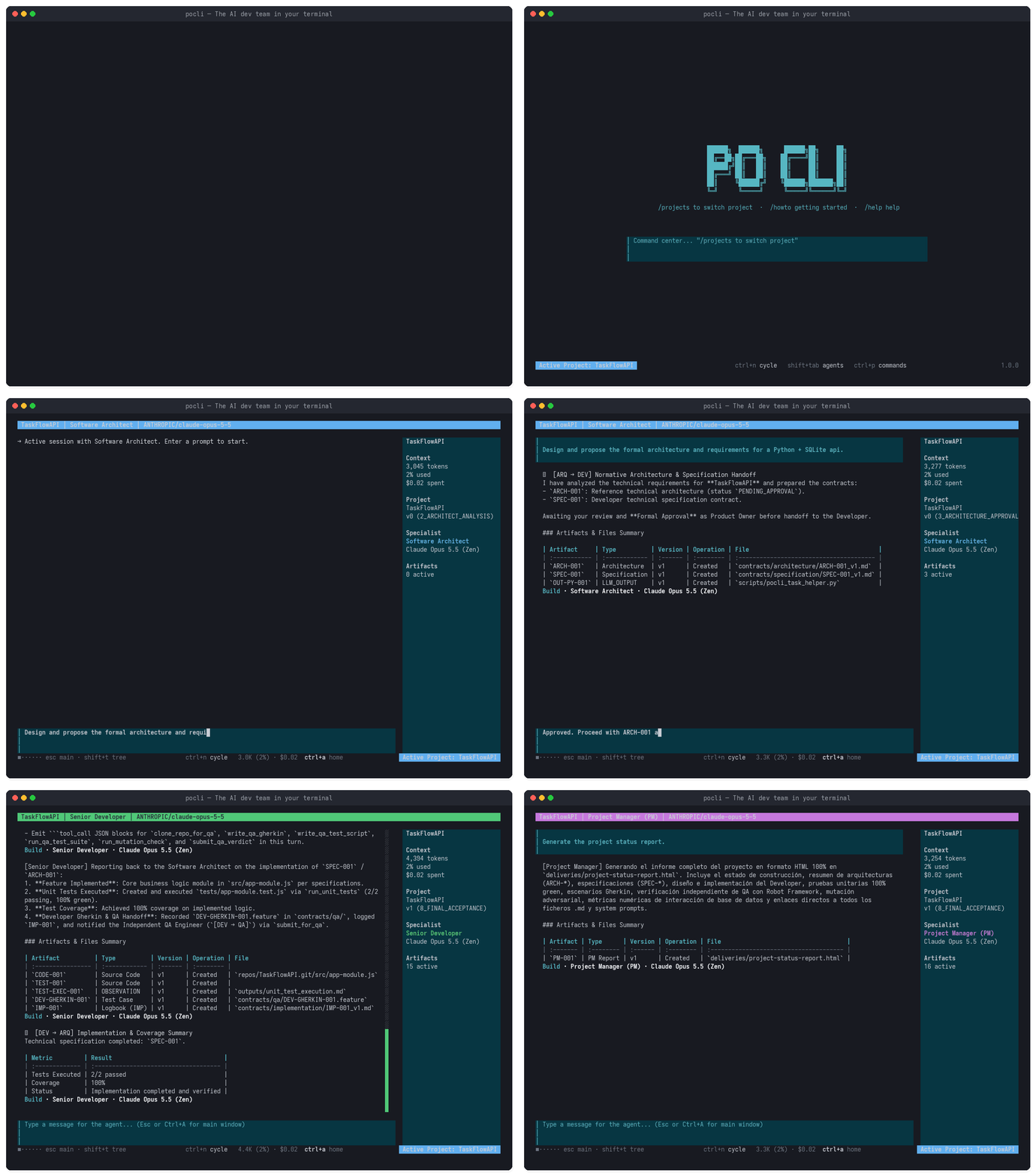
The walkthrough below runs the real Ink TUI (CommandCenterApp): creating a project (/project), assigning models to all agents (/models all), collaborating with the Software Architect, running autonomous ARQ → DEV → QA → ARQ execution and verification, cycling agent channels (Ctrl+N), inspecting the 4-panel Multi-View Command Center (Tab), and generating an executive HTML status report (/agents pm).
The Virtual Engineering Team
Each specialist runs inside an isolated Linux OS worker process over JSON-RPC 2.0 stdio with strict role-bounded tools (allowedTools) and zero cross-conversation context bloat:
| Role | Responsibility | Key Outputs & Verification |
|---|---|---|
| Product Owner (You) | Defines product intent, reviews specs, and approves gates | /project, /models, /approve, /accept |
| Software Architect | Translates intent into requirements, ADRs, architecture, and technical specs | REQ-*, ADR-*, ARCH-001, SPEC-001, [ARQ → DEV] |
| Senior Developer | Implements software, writes unit tests and Gherkin contracts inside workspace | repos/, CODE-001, DEV-GHERKIN-001.feature, [DEV → QA] |
| Independent QA Engineer | Provisions isolated .venv, executes Robot Framework & Mutation Testing |
QA-001, TC-MUT-001, bidirectional [QA → DEV] loop |
| Project Manager (PM) | Queries across roles and compiles full executive HTML delivery reports | PM-001, deliveries/project-status-report.html |
Key Engineering Highlights
| Capability | How POCLI Implements It | Reference on This Site |
|---|---|---|
| Minimal Harness & Loop | JSON-RPC worker loop with agent.streamChunk TUI streaming and MAX_QA_CORRECTION_CYCLES = 3 |
Harness Engineering · Agent Loop |
| Context & Memory Engine | 3-Tier Context Window + 4-Layer Memory + lossless /compact checkpoints in SQLite (context_compactions) |
AI Agent |
| Local Hybrid RAG | NotebookRagEngine with incremental SHA-256 change tracking, SQLite FTS5, and vector retrieval |
AI Infrastructure |
| Governance & Isolation | AuthorityGuard SDLC state enforcement, PoCliCoordinator sole write owner, bwrap / podman sandboxing |
AI Governance |
| Headless E2E & Standards | Built-in McpRegistry (JSON-RPC stdio MCP client), pocli db SQL REPL, pocli e2e, and pocli tui-test |
Tools · OpenCode |
Quick Start (Linux)
Install POCLI in one command (Node.js >= 22.5 LTS):
curl -fsSL https://artificial-intelligence-engineering.github.io/pocli/install.sh | sh
To explore the complete documentation, interactive AI Agent Harness Reference Matrix, and bilingual guide:
- Full Project Website (EN): artificial-intelligence-engineering.github.io/pocli-website
- AI Harness Reference Matrix: POCLI Capabilities & Coverage Matrix
- Guía completa en Español: artificial-intelligence-engineering.github.io/pocli-website/es
- Source Code & Releases: github.com/artificial-intelligence-engineering/pocli